
Skip to content
English - United States
  • There are no suggestions because the search field is empty.

Removing a Group from Website 

To remove a group from being posted online, if they're full or want to cap at a specific size:

  • In Hubspot, search for the rotation 
  • Scroll down on the left hand side, find "Group Capacity" in the drop down and select "Yes" 
  • This will remove the group from the website and close the registration
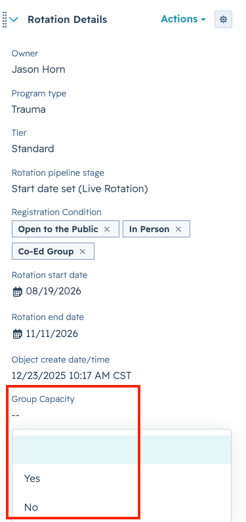
Screenshot 2026-07-21 at 2.37.12 PM

This option also may be used for a private group who wants to register their set participants and then have you close the group so no one else can join